MICROSOFT TEAMS PHONE • DIRECT ROUTING

Use Microsoft Teams as Your Office Phone

Keep the Teams experience your staff already knows—then add business-grade calling.

With SolSwitch Direct Routing, users place and receive external calls inside Teams, while SolSwitch handles call flow, features, and reliability.

One Place to Call

Place inbound and outbound PSTN calls from inside Teams - desktop or mobile.

PBX-Grade Features

Auto-attendant, queues, time rules, voicemail-to-email, and more.

Local Support

Sunwire helps design, deploy, and support your call flows end-to-end.

Keep Your Numbers and Identity

Use your main business numbers and extensions - without giving everyone a DID.

Better Call Handling

Auto-attendants, queues, schedules, routing rules, overflow, after-hours.

Consistent Experience

Users call from Teams; administrators manage the phone system in SolSwitch.

Designed and Supported by Sunwire

Architecture, cutover planning, testing, training, and support.

Why Teams + SolSwitch?

Teams is where conversations already happen. SolSwitch adds the telephony layer—call routing, system features, reporting, and real support - so Teams can function like a true business phone system.

  • How Direct Routing Works
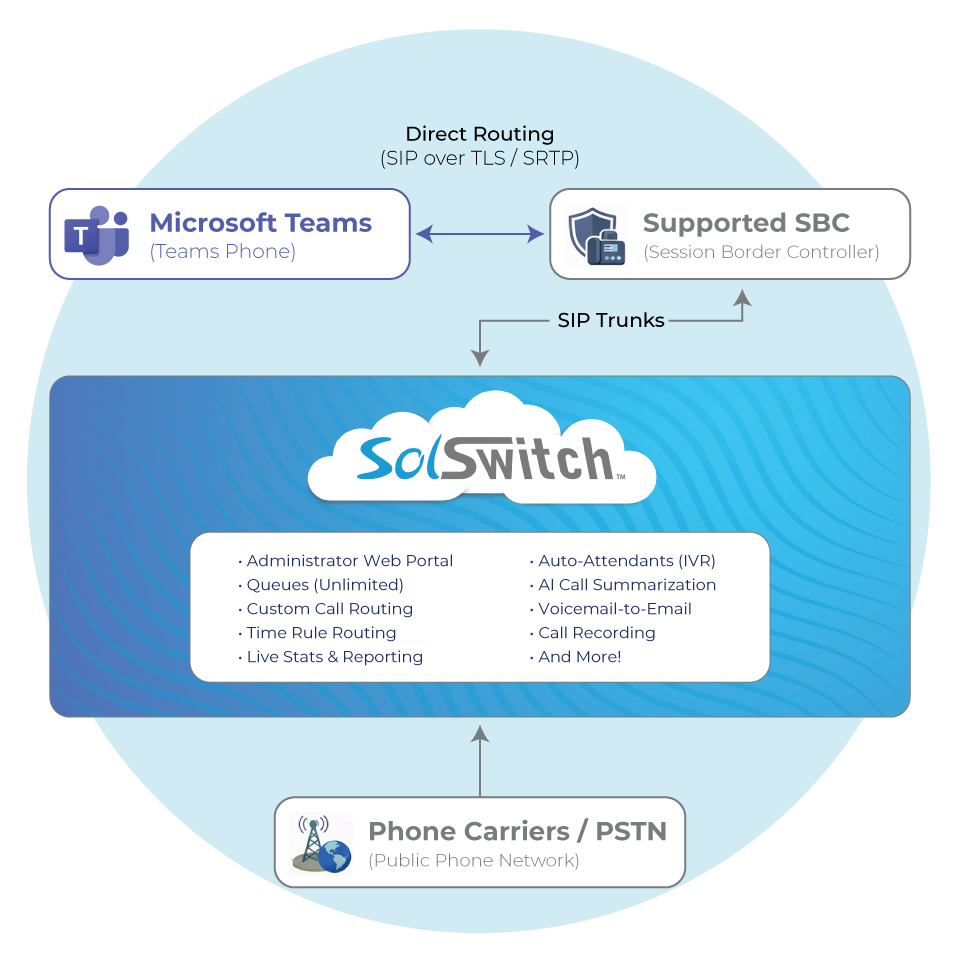
    Direct Routing connects Microsoft Teams Phone to PSTN connectivity through a supported Session Border Controller (SBC). SolSwitch is the platform that routes calls, applies your business rules, and integrates with your telephony services.

  • Users call out from MS Teams on Desktop or mobile.
  • Calls route via Direct Routing through the SBC / trunk path.
  • SolSwitch controls call flow: Auto-attendants (IVRs), queues, time rules, voicemail, AI tools, etc.
  • Sunwire supports it from design and deployment to testing, and ongoing changes.
What Sunwire Handles
  • Discovery & design (call flows, queues, auto-attendants, schedules)
  • Configuration + validation testing
  • Number porting / routing coordination (where applicable)
  • User enablement + go-live support
  • Ongoing changes and optimization

What You'll Need:

  • Microsoft Teams Phone licensing for users who will place/receive PSTN calls.
  • Direct Routing connectivity (via a supported SBC path).
  • Your PSTN plan (numbers/trunks) and desired call flows.
  • Implementation window for testing + cutover (we’ll help plan it).

Sunwire can also help with all of the above!


Simply add MS Teams Direct Routing access to any Hosted SolSwitch plan.

Add Teams Direct Routing to your SolSwitch users and keep your call routing centralized.

Teams Direct Routing Access

With SolSwitch Hosted Pro and Pro+ (per user)
$2.46/mo.
With SolSwitch Hosted Enterprise+
Included!
Request Pricing & Eligibility
A $500 one-time setup fee per domain is applicable.

Bring SolSwitch features into your Teams calling

Teams becomes the dialer. SolSwitch becomes the phone system.

  • Administrator Web Portal

    Easily customize and adjust your entire system on the fly with the click of the mouse.

  • Auto-Attendant (IVR)

    An IVR allows callers to navigate the phone system using pre-recorded voice prompts and touch-tone or vocal responses.

  • Queues (Unlimited)

    Queues are used as a way of handling incoming calls by following infinite rulesets specified by the system's administrator.

  • Reporting and Live Stats

    Track every leg of every call, live queues and evaluate important call data insights.

  • Time Rules

    Program your system to route incoming calls appropriately, any time, day or night, weekend or holiday.

  • Voicemail-to-Email

    Voicemail messages can be delivered by email to one or multiple addresses so that they can be listened to from your inbox or mobile.

Ready to enable Teams calling with SolSwitch?

Tell us your user count and call flow needs—we’ll map the best path to go-live.

F • A • Q
Frequently Asked Questions

No. This solution uses Microsoft Teams Phone with Direct Routing. Users call from Teams; SolSwitch powers call routing and PBX features in the background.

Yes. Many organizations keep their existing numbers and extension structure while enabling Teams users to call externally through those numbers and call flows.

Those stay in SolSwitch. You still get business-grade routing rules - while users call from Teams.

It depends on users, sites, numbers, and call flow complexity. We’ll provide a clear plan with testing and a controlled cutover window.

Contact Sunwire Now!

Visit Us

850 Barrydowne Road
Sudbury, ON
P3A 3T7

Send us a message

Please, review your data and try again!
Thank you for your message!

Live Chat

Powered by SolSwitch

Thank you for reaching out. Please share your name and how we can assist you. A team member will be with you as soon as possible.

Agent

Live Chat

Powered by SolSwitch

Thank you for reaching out. Please share your name and how we can assist you. A team member will be with you as soon as possible.

Agent
Sunwire Cookie Consent: We use cookies to provide you with a better user experience, serve personalized content and analyze our traffic. By clicking "Accept All", you consent to our use of cookies.